
App for iPhone and Android
Smart access control for condominiums, rural parcels and buildings in Chile
Open the gate from your phone or with your QR code, invite guests on a schedule via WhatsApp, add your family and trigger your sector's community alarm.
- No remotes or keys
- A QR that works with no signal
- Readers that validate offline

Open from your phoneGates and doors with one tap, only the ones you're authorized for.
A QR that changes on its ownAn old screenshot won't work, and it works even with no signal.
Keeps working offlineReaders validate QR codes and cards against their stored list.
Alarm by sectorA siren with a voice announcement of the reason and the parcel.
From your phone to the gate in four steps
Your community's management creates your account and decides which doors you can open. From there, getting in is this simple:
Show your QR or tap ABRIR
At the door reader, show your QR code or hold up your card. Or tap ABRIR (Open) in the app, wherever you are.
Your permission is checked
The reader checks your QR or card against its stored list, or the server confirms you're allowed through that door.
The gate opens
The reader's relay or the gate's Tuya module receives the command. If several neighbors tap ABRIR at once, only one command goes through.
It's logged
The opening goes into the history: who, which entrance and when. If the reader was offline, it uploads the record once the connection is back.
Everything you need, in the app and at every entrance
A condominium app built for residents and their guests, with on-site readers that don't depend on the internet.
For residents
Open with one tap
Open gates and doors from your phone, with no remotes or keys. You only see the entrances you're authorized for.
A personal QR that changes on its own
Get in by showing your QR at the reader. The code changes every so often, so an old screenshot won't work.
QR with no signal on your phone
In the underground garage or without mobile data you can still get in: you only need internet once to activate your QR.
Invitations via WhatsApp
Pick your guest from your contacts and send them a link. Your guest opens from their browser, with nothing to install.
Family accounts
Add your family from the app and decide which doors each member can open.
Live camera
Before opening, watch the entrance camera live, if a Tuya camera is linked to it.
Your access history
Review your own openings and your guests' openings at each entrance.
Fingerprint or face login
Unlock the app with your fingerprint, face or phone PIN. The app doesn't store your password.
Security and on-site hardware
Readers with memory and a clock
Each reader stores its door's credentials on a microSD card and keeps time with a real-time clock (RTC), so it can validate offline.
Doors on LoRa radio
Interior or remote doors with no WiFi connect by radio (915 MHz) to a Central that has internet.
Automatic sync
Permission changes reach the readers on their own, and a sync can also be forced right away.
One command at a time
If several neighbors tap ABRIR together, the gate gets a single command and the others see how many seconds to wait.
Reader-only doors open from the app too
Even if a door only has a QR or card reader, you can still open it from the app, just like any gate.
Tuya relays and cameras
Use the Tuya relay modules and cameras you already have. Each condominium uses its own credentials.
Online status
The app shows whether an entrance is online or offline before you try to open it.
Sirens by sector
One receiver per sector with a siren and voice announcement, coordinated by a central alarm module.
This is NexoDomo on your phone
The resident app as shown on its Google Play listing. The screenshots show the app in Spanish; you can switch it to English in Profile.
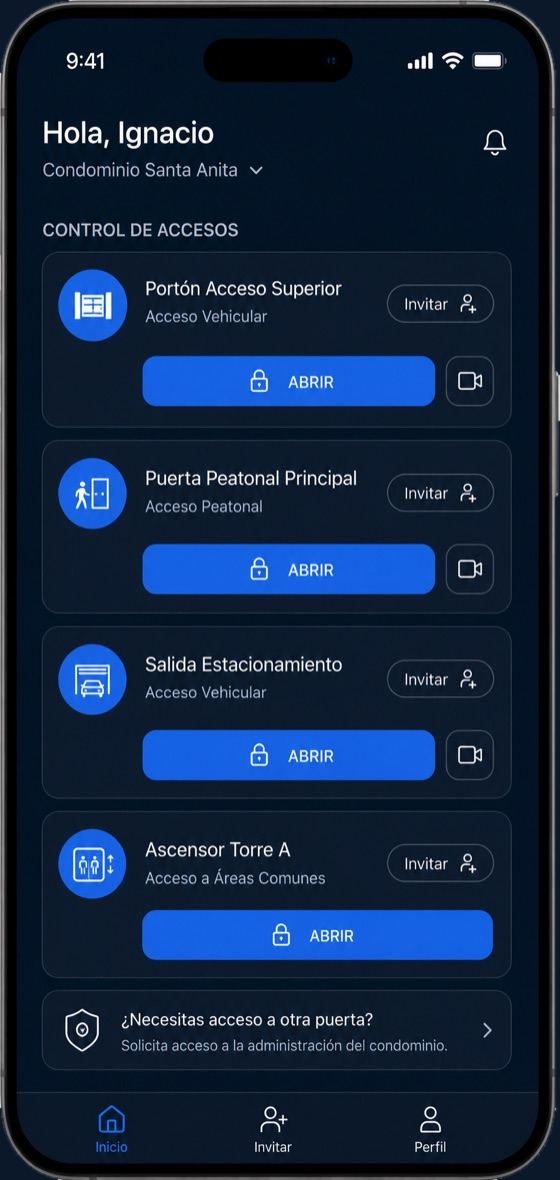
Your entrancesEvery gate and door you're authorized for, each with ABRIR (open) and Invitar (invite), plus a camera where one is linked. 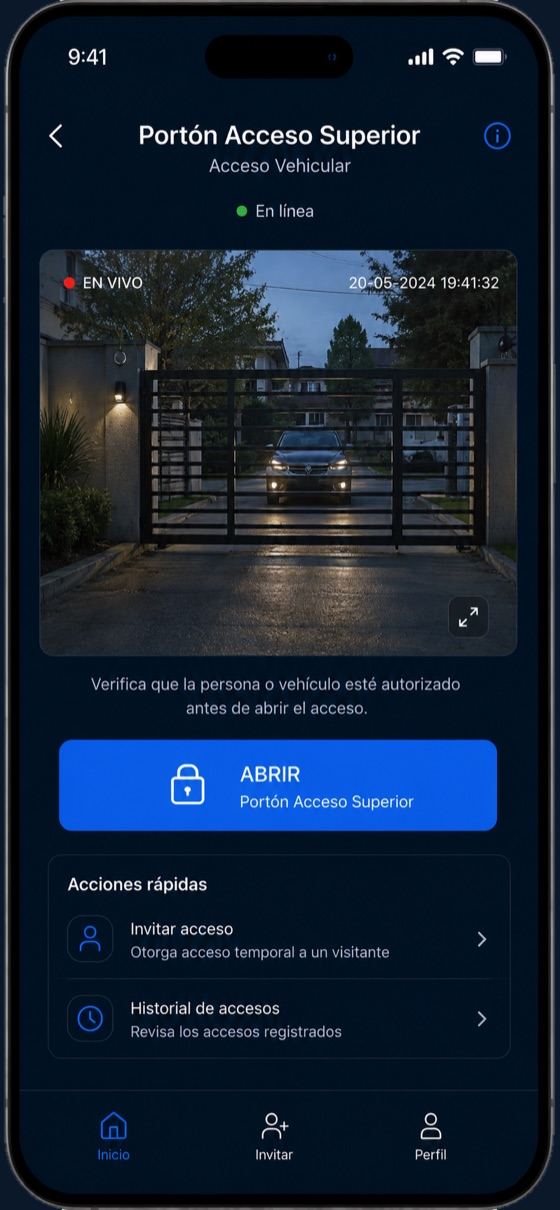
Live cameraThe entrance detail shows whether it's online, the live camera and the ABRIR button. 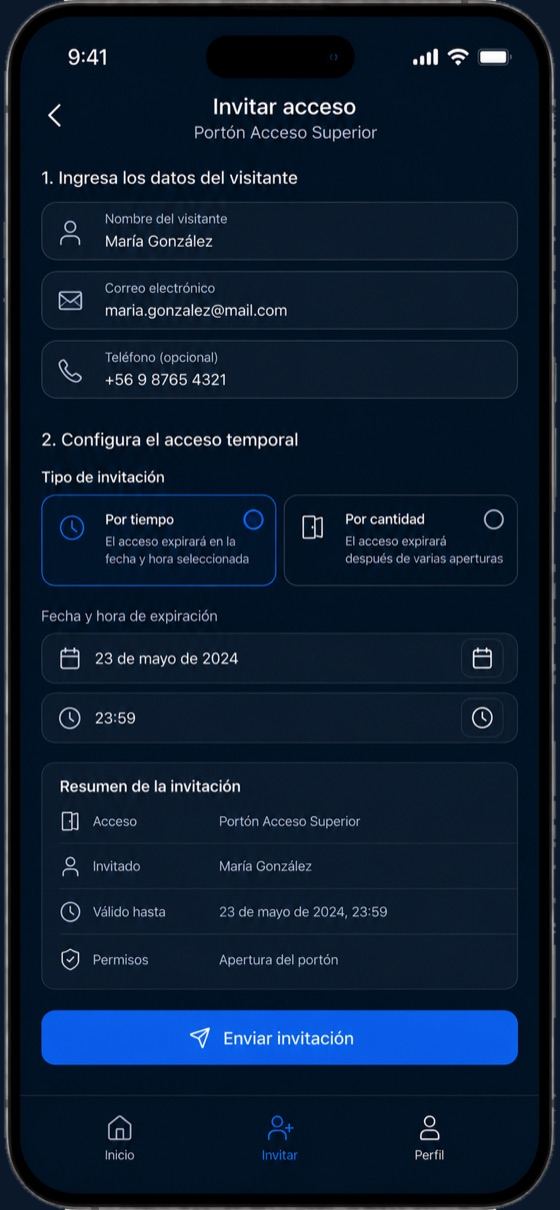
Invite accessGuest details, validity by date and time or by number of openings, and a summary before sending. 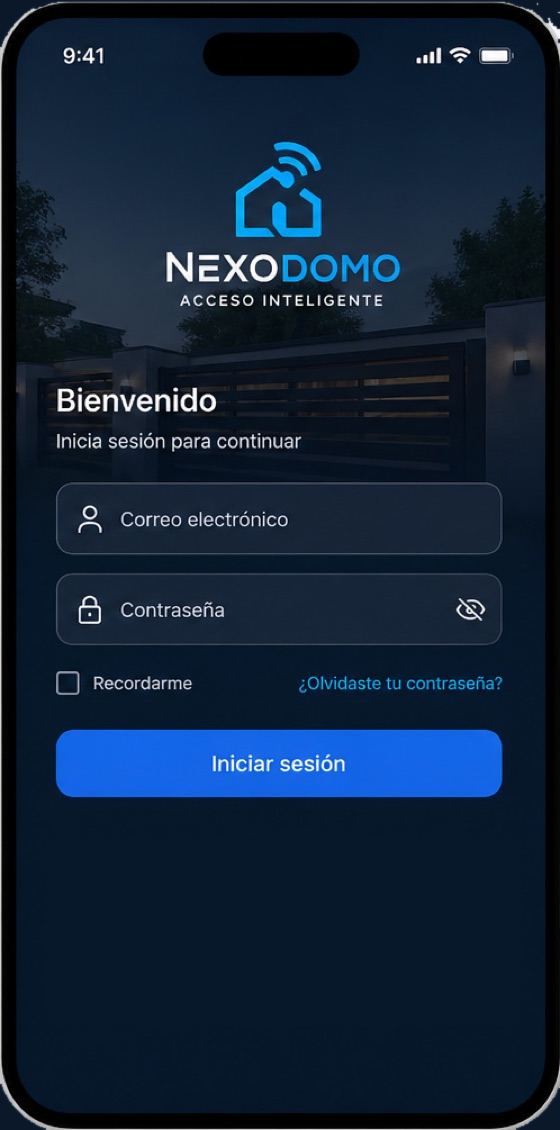
Signing inSign in with the email your community's management registered for you. 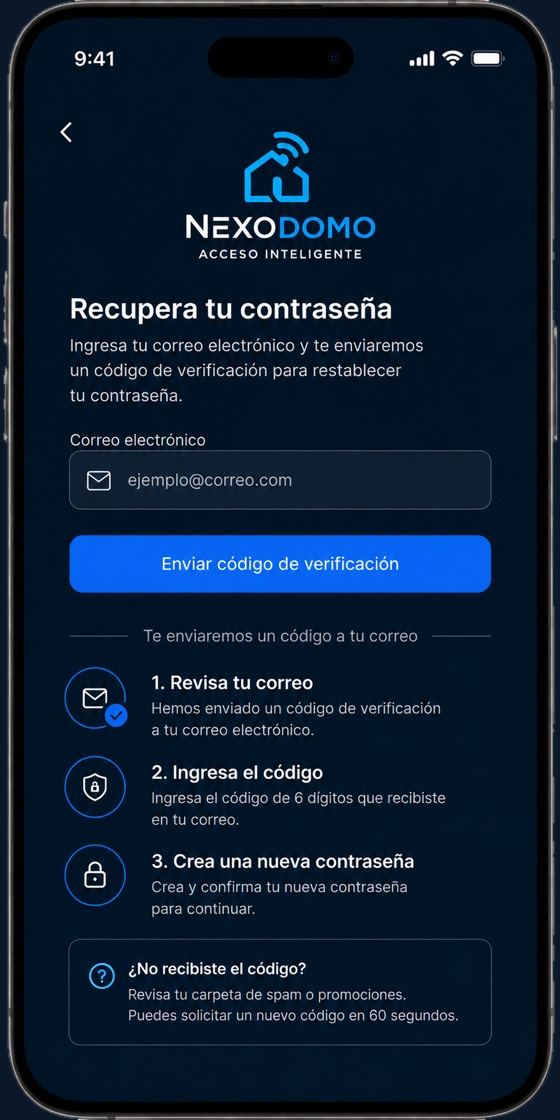
Password recoveryRequest a temporary password by email, valid for 2 hours. Your current password keeps working.


Open the gate from your phone, wherever you are
Every entrance in your condominium shows up in the app with its status. Tap ABRIR and you're in: no remotes to lose and no key copies to hand out.
- Watch the entrance camera live before opening, if a Tuya camera is linked to it.
- See whether the gate is online or offline before you try to open it.
- If several neighbors tap ABRIR at the same time, the gate gets a single command and the others see how many seconds to wait (20 by default).
- Doors that only have a QR or card reader can also be opened from the app. If the reader is offline, the app tells you and suggests using your QR.
- Every opening is logged: who opened, which entrance and when.

Invitations for guests, family and service providers
Invite anyone without lending out your remote: your guest gets a link via WhatsApp and opens from their phone's browser, without downloading any app.
- One person, several people (each with their own link) or a whole group with a single link and a quota per person.
- A schedule per entrance: dates, days of the week, time window and number of openings. For example, the gardener Monday to Friday from 9:00 to 18:00.
- Pick the guest from your contacts and the app opens WhatsApp with the message ready. You hit send.
- The link is tied to the first phone that uses it: if your guest forwards it, it won't work for anyone else (except group invitations).
- Your guest can also show a QR at the door reader, depending on the reader installed.
- In My invitations you see how many openings were used and revoke them whenever you want.

Family accounts: every member with their own access
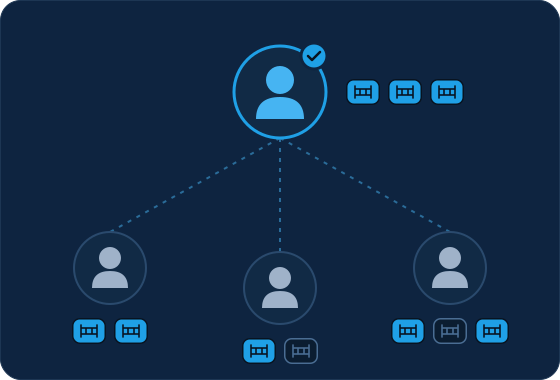
The account holder adds family members from the app, without going through your community's management, and decides which doors each one can open. Everyone signs in with their own account, so the history shows who opened.
- Up to 10 members by default, with access only to the holder's doors.
- They inherit the holder's parcel and alarm sector.
- The holder can suspend them, reset their password or remove them.
- Combined activity for the whole family in one place.
Gate readers that keep working without internet
On rural parcels, in underground garages or anywhere with poor signal, an outage shouldn't leave anyone locked out. NexoDomo readers store the list of authorized credentials for their door and validate QR codes and cards on their own.
Doors without WiFi, connected by LoRa radio
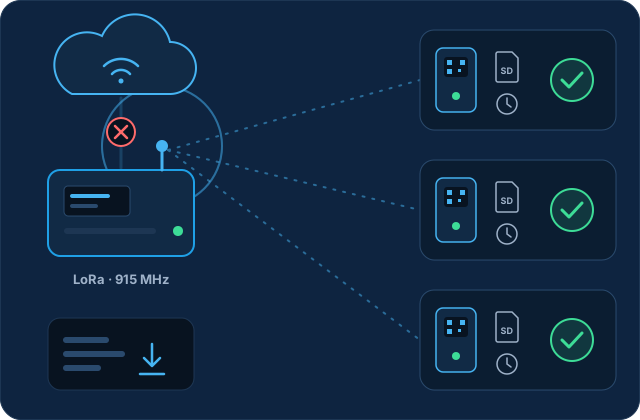
For interior or remote doors that WiFi or network cabling can't reach, each door talks over LoRa radio (915 MHz) to a Central that does have internet. The door validates on its own, and the Central syncs the lists, relays remote openings, uploads the records and keeps the doors' clocks on time.
Keeps working offline
- Your resident QR: generated on your phone with no data. You only need internet once to activate it.
- QR and card readers: validate against the list stored on their microSD and fire their own relay.
- Entry log: stored on the reader and uploaded when the connection is back, with no duplicates.
- LoRa doors: validate on their own, including guest QR invitations.
Needs a connection
- Remote opening from the app: the phone and the reader or Central must be online.
- Tuya gates and cameras, which depend on the cloud.
- The guest web link and creating invitations.
- Triggering the alarm from the app, and notifications.
When do readers update? When they power on and once a day. When you create or revoke an invitation, or a sync is forced, connected readers update right away. An offline reader applies the changes at its next sync.
Community alarm by sector
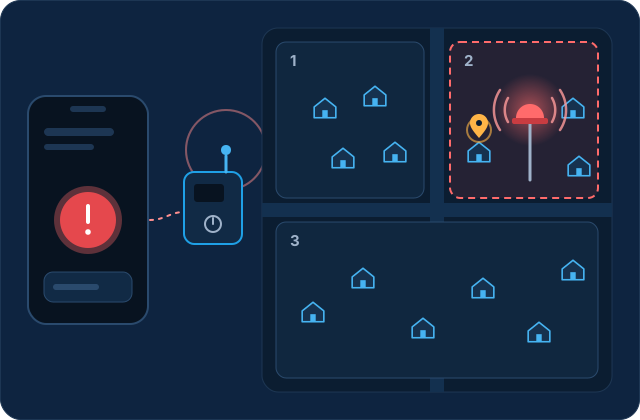
In an emergency, you trigger the alarm from the app. The siren in your sector sounds, not across the whole condominium, with a voice announcement stating the reason and the parcel.
- Choose the reason, such as fire, medical emergency or suspicious person, from the ones your community's management enables.
- Your neighbors see the alarm in the app and get a notification on their phone when available. On Android, each person chooses whether it rings or just vibrates.
- The siren plays the number of cycles you chose (1 to 10) and switches off on its own.
- Repeat triggers are prevented: a 30-second wait between alarms, one active alarm per resident, and only the person who triggered it can switch it off.
- Each sector siren's volume can be adjusted remotely, without climbing the pole.
- The app shows who triggered each alarm, the reason and the sector, with activity from the last 7 days.
Requires the central alarm module and one siren receiver per sector installed in the condominium.
How we protect every entrance
A dynamic QR, explicit per-door permissions and a record of everything. This is what the system actually does, without the hype.
A dynamic, rotating QR
Each resident QR is computed with HMAC-SHA256 over its own seed and changes every 60 seconds by default (adjustable from 15 to 600). With online validation, each code works only once.
Protected passwords
They're stored as bcrypt hashes and require at least 8 characters with an uppercase letter, a number and a symbol. The temporary password must be changed at first login.
Explicit permission per door
Every opening, camera view and invitation is checked against the permission for that door. Your invitations can only include doors you can open.
One key per reader
Each reader authenticates with its own key, which the server checks against its hash and which is tied to a single door. It can be rotated or revoked at any time.
Random links
Invitations use 96-bit random tokens, and the opening quota is reserved atomically, so it can't be exceeded even with repeated taps.
Readers deny by default
If a reader has no credential list, it doesn't open. And it won't accept QR codes until its clock has the time set.
Everything is logged
Every opening goes into the history, including your guests' openings and the ones a reader stored while offline.
Limits against abuse
Per-IP request limits on public links and readers, limits on password recovery, and a per-door lock against repeated commands.
Your privacy
We don't sell your information. The app doesn't record or store camera video and doesn't upload your whole address book. Privacy policy
Access control for condominiums, rural parcels, subdivisions and buildings
NexoDomo adapts to communities of different sizes in Chile, with or without good connectivity at each entrance.
Gated housing communities
Vehicle gates and pedestrian doors that open from the app, by QR or by card, plus scheduled invitations for guests and service providers.
Rural parcels and subdivisions
Remote or WiFi-less entrances connected by LoRa radio, readers that validate offline and a sector alarm that announces the parcel.
Residential buildings
Pedestrian entrances, parking and common areas with per-door permissions and a live camera at entrances that have a Tuya camera.
Property managers
One solution for every community you manage, with setup and the initial resident onboarding handled by T3 Chile.
Administration committees
Clear rules for the community: per-door permissions, scheduled invitations, cards that can be blocked and a history to review.
Step-by-step implementation
How NexoDomo comes to your condominium, from the site visit to day-to-day operation.
Site survey
We review each entrance (vehicle, pedestrian, common areas), whether it has WiFi, whether it already has a Tuya module or camera, and define the alarm sectors and parcels.
Condominium setup
We set up the condominium with its time zone and register the entrances, their cameras and the QR/RF readers, each reader with its own unique key.
Hardware installation
A reader with microSD and a clock at each door with WiFi, or LoRa nodes connected to a Central. If the condominium includes the alarm, the central module and one siren receiver per sector.
Resident onboarding
We load the residents with their authorized doors. Each resident receives a temporary password by email, and cards are registered by holding them up to the reader.
Sync and testing
We sync each reader and run full tests: opening from the app, entering by QR with no mobile data, by card, with an invitation and, if applicable, a test alarm per sector.
Launch with residents
Residents install the app, change their password, activate their QR with internet once and, if they like, turn on fingerprint login. Account holders add their families.
Operation and support
The condominium is up and running, with every opening logged in the history. For questions, write to us: we usually reply within 24–48 business hours.
Download the NexoDomo app
Available for iPhone on the App Store and for Android on Google Play.
How do I sign in for the first time?
- Your community's management creates your account and you receive a temporary password by email.
- Download the app and sign in with your email and that password.
- Create your new password, and you're ready to open, invite and activate your QR.
Your condominium doesn't use NexoDomo yet? Tell us and we'll talk it through with your community's management.
Frequently asked questions about condominium access control
What is a condominium access control system?
It's the combination of hardware and software that decides who can open each gate or door and keeps a record of every opening. With NexoDomo, your community's management assigns each resident the doors they can open, and residents get in from the app, with their QR code or with a card, depending on the equipment at each entrance, with no remotes or keys.
Can I open the condominium gate from my phone?
Yes. The app shows the entrances you're authorized for and you tap ABRIR (Open). If a Tuya camera is linked to the entrance, you can watch it live before opening. To open remotely you need internet on your phone and the gate must be connected.
Do my guests need to download the app?
No. Your guest gets a link that opens in their phone's browser, picks the entrance and taps ABRIR. The link is tied to the first phone that uses it, so if they forward it, it won't work for anyone else (except group invitations, which are meant to be shared).
Can I limit when my guest can come in?
Yes. For each entrance you can set dates, days of the week, a time window and a number of openings. For example, Monday to Friday from 9:00 to 18:00 with two openings a day. In My invitations you can see how many openings were used and revoke the invitation whenever you want.
What if I have no signal in the underground garage?
If your entrance has a NexoDomo reader, you can still get in with your QR. The code is generated on your phone without internet; you only need a connection the first time to activate it. The reader validates it against its stored list, without going online.
What if the condominium's internet goes down?
NexoDomo readers keep accepting authorized QR codes and cards using the last list they synced. They store a record of every entry and upload it when the connection is back. What does need internet is remote opening from the app, Tuya gates and cameras, and the guest web link.
Can someone get in with a photo of my QR?
Your code changes on its own every 60 seconds by default, so a screenshot stops working within a couple of minutes. And with online validation, each code works only once.
Can I use a card instead of my phone? What if I lose it?
Yes, if your entrance has a NexoDomo reader. Your community's management registers your card. If you lose it, let them know so they can revoke it: readers stop accepting it at their next sync, or right away if a sync is forced while the reader is connected.
Can I give my family access?
Yes. As the account holder you can add members from the app (up to 10 by default) and choose which doors each one can open, out of the ones you have. You can also suspend them, reset their password or remove them, and see the whole family's activity.
How does the community alarm by sector work?
If your condominium has the NexoDomo alarm installed, you choose what's happening in the Alarm tab (fire, medical emergency, suspicious person, etc.). The siren in your sector sounds with a voice announcement of the reason and the parcel, and your neighbors see it in the app and can get a notification. The siren switches off on its own after the number of cycles you chose, or you can switch it off yourself.
Does it work for rural parcels and subdivisions?
Yes. Doors without WiFi can connect by LoRa radio to a Central that has internet. The door validates QR codes and cards on its own, and the Central takes care of syncing and remote openings. The sector alarm also announces the parcel where the emergency is happening.
Are you a resident having trouble with the app? Visit the support center.
Request NexoDomo for your condominium
Tell us about your condominium, rural community or building, and let's talk about how to set up NexoDomo. We usually reply within 24–48 business hours.